 By Caleb Morgan
Updated November 2026
Gravel riding asks more of a bike computer than road riding does. You need clear screens in bright sun, reliable navigation on unmarked dirt roads, long battery life for all-day rides, and a mount that stays put on rough surfaces. This guide looks at the best bike computer for gravel riding by comparing six real models against four criteria: navigation and mapping, battery endurance, durability and water resistance, and how well each one suits the way gravel riders actually train and explore. Each pick is matched to a specific need so you can see which one fits your riding.
Our top picks at a glance
- 1
 TOP CHOICEBest overallGarmin Edge 850 GPS Cycling ComputerView on Amazon
- 2
 TOP CHOICEBest for turn-by-turn navigationiGPSPORT BSC500 GPS Bike ComputerView on Amazon
- 3
 TOP CHOICEBest for training data on a budgetMagene C506 GPS Bike ComputerView on Amazon
- 4
 Best for compact, lightweight mountingWahoo ELEMNT BOLT V3 Aero GPS Bike ComputerView on Amazon
- 5
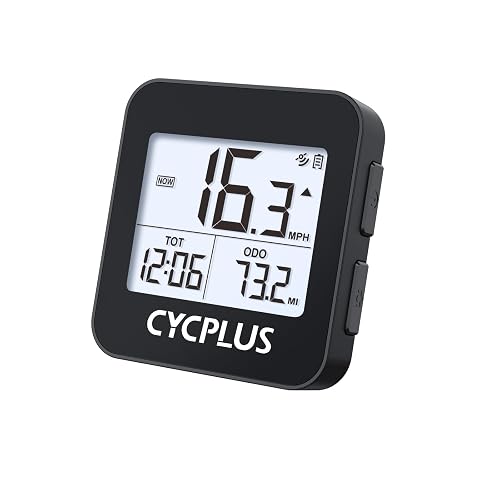 Best budget pickCYCPLUS Wireless GPS Bike Computer G1View on Amazon
- 6
 Best basic option for simple ridesCATEYE Wired Bike ComputerView on Amazon
Our Top Picks
Quick Comparison
| Product | Best for | Key feature |
|---|---|---|
| Garmin Edge 850 GPS Cycling Computer | Overall gravel use with training and safety features | Compact 2.7″ touchscreen with road hazard alerts |
| iGPSPORT BSC500 GPS Bike Computer | Turn-by-turn navigation on unfamiliar routes | 3.3″ touchscreen with map voice navigation |
| Magene C506 GPS Bike Computer | Training-focused riders who want a larger display | 2.4″ color touchscreen with Wi-Fi and Bluetooth |
| Wahoo ELEMNT BOLT V3 Aero GPS Bike Computer | Riders who want a small unit with strong battery life | 2.3″ color screen with dual-band GPS and about 20-hour battery |
| CYCPLUS Wireless GPS Bike Computer G1 | Riders who want core data without a large spend | Lightweight body with long working time and IPX6 rating |
| CATEYE Wired Bike Computer | Simple speed, distance and time tracking | Auto start/stop and easy wired setup |
Garmin Edge 850 GPS Cycling Computer
Garmin Edge 850 GPS Cycling Computer, Compact 2.7" Touchscreen Color Display, Advanced Training & Stamina Insights, GroupRide Messaging, Road Hazard Alerts, ClimbPro, Garmin Pay, MTB Metrics Bundle
Best for: Overall gravel use with training and safety features
This is the most complete unit on the list. It suits riders who want strong training analysis, group ride features and hazard warnings alongside everyday navigation on mixed gravel and paved routes.
Key specs
- Compact 2.7-inch color touchscreen
- Advanced training and stamina insights
- ClimbPro climb guidance
- Road hazard alerts and GroupRide messaging
- MTB Metrics bundle included in this listing
Pros
- Deep training metrics for structured gravel workouts
- Hazard alerts help on fast descents and busy shared roads
- Compact screen mounts neatly on narrow handlebars
Cons
- Many advanced features can take time to learn
- Screen is smaller than the 3.3-inch iGPSPORT, which matters if you prefer large map views
Bottom line: Choose this if you want a full-featured computer that covers training, navigation and safety in one unit.
iGPSPORT BSC500 GPS Bike Computer
iGPSPORT BSC500 GPS Bike Computer, 3.3'' Touch Screen MAP Voice Navigation
Best for: Turn-by-turn navigation on unfamiliar routes
Gravel riders who explore new backroads and want map-based guidance without phone dependence will get the most from this model. The large screen makes route lines easier to read at a glance.
Key specs
- 3.3-inch touchscreen
- MAP voice navigation
Pros
- Large display makes map details easy to read while moving
- Voice navigation reduces the need to look down at turns
- Good fit for riders building their own cue sheets
Cons
- Larger body adds weight and bulk to a cockpit already crowded with bags
- Battery use rises noticeably when map and voice features run for long periods
Bottom line: Pick this if navigation is your top priority and you ride routes you don’t know well.
Magene C506 GPS Bike Computer
Magene C506 GPS Bike Computer – 2.4" Color Touchscreen, Smart Navigation, Fast WiFi & Bluetooth, Riding Assistant Wireless, Indoor Cycling & Training
Best for: Training-focused riders who want a larger display
This unit fits riders who track training data and want Wi-Fi and Bluetooth connectivity for syncing rides, along with a color touchscreen that is easy to read.
Key specs
- 2.4-inch color touchscreen
- Smart navigation
- Wi-Fi and Bluetooth connectivity
- Indoor cycling and training support
Pros
- Wi-Fi and Bluetooth make ride uploads convenient
- Works for both outdoor gravel and indoor training
- Color screen is clear and easy to customize
Cons
- Owners often report that the app setup takes some patience at first
- Brand recognition is lower than Garmin or Wahoo, which may matter if you value long-term support history
Bottom line: A strong choice for training-minded riders who also ride indoors in winter.
Wahoo ELEMNT BOLT V3 Aero GPS Bike Computer
Cycling Computer • 2.3in Color Screen • Turn-by-Turn Navigation • DualBand GPS • 20hr Battery • ANT+, Bluetooth, Wi-Fi • IPX7 Wahoo ELEMNT BOLT V3 Aero GPS Bike Computer with Navigation
Best for: Riders who want a small unit with strong battery life
Gravel riders with long days in the saddle benefit from the battery rating and the compact body. Dual-band GPS also helps with signal accuracy in canyons and wooded areas.
Key specs
- 2.3-inch color screen
- Turn-by-turn navigation
- Dual-band GPS
- About 20-hour battery life, as specified by the listing
- ANT+, Bluetooth and Wi-Fi connectivity
- IPX7 water resistance
Pros
- Long battery life suits all-day gravel rides
- Compact body keeps the cockpit uncluttered
- IPX7 rating handles heavy rain and wet grit well
Cons
- Screen is smaller than the 3.3-inch iGPSPORT display
- Some riders prefer a larger map area for route planning
Bottom line: Best for riders who want a slim, weather-resistant unit with dependable endurance for long days.
CYCPLUS Wireless GPS Bike Computer G1
CYCPLUSPocket-Size, Bicycle Speedometer Odometer with Automatic Backlight, >55h Working Time, Provide Professional Data Analysis Wireless GPS Bike Computer G1, 70g, 2.0" Screen, IPX6, 1200mAh
Best for: Riders who want core data without a large spend
This is a light, simple unit for riders who mainly want speed, distance, time and basic GPS tracking. It keeps things uncomplicated.
Key specs
- 2.0-inch screen
- Weighs 70 g, as specified by the listing
- IPX6 water resistance
- 1200mAh battery, with working time stated as over 55 hours
Pros
- Very light and easy to mount
- Long working time for casual riders
- Straightforward interface with few menus
Cons
- Small screen can be harder to read in bright sun
- Limited advanced training and navigation features compared with premium units
Bottom line: A sensible pick for riders who want basic GPS data at a modest cost and don’t need mapping.
CATEYE Wired Bike Computer
Entry-Level Speedometer and Odometer, Perfect for Beginner Cyclists, Auto Start/Stop, Easy Setup for Road, MTB, Gravel Bikes CATEYE Wired Bike Computer
Best for: Simple speed, distance and time tracking
This wired unit suits riders who want a no-fuss display on a bike that doesn’t need GPS. It is also an easy option for a second bike or a gravel commuter.
Key specs
- Speedometer and odometer
- Auto start/stop
- Wired connection with no batteries to charge
Pros
- Simple setup with no pairing required
- No GPS means no charging routine during rides
- Works well for riders who only need core ride numbers
Cons
- No navigation, mapping or training analytics
- Wired installation takes more time and can be fiddly on drop bars with tight cable routing
Bottom line: Choose this for uncomplicated tracking if you don’t need GPS or route guidance.
Buying Guide
Navigation and Mapping
Gravel routes are often unmarked, so map display and turn prompts matter more than on paved roads. Look for a unit that can load route files from your planning app and show a clear track line. Voice prompts help when you can’t safely look down.
Good picks for this: iGPSPORT BSC500 GPS Bike Computer, Garmin Edge 850 GPS Cycling Computer
Battery Life
Plan for the longest ride you do. Manufacturers specify battery figures under particular conditions, and map-heavy use or cold weather will shorten them. Carry a power bank or a charging cable if you ride long distances or routes with no outlets.
Good picks for this: Wahoo ELEMNT BOLT V3 Aero GPS Bike Computer, CYCPLUS Wireless GPS Bike Computer G1
Screen Size and Readability
Bright sunlight and dust can make small screens hard to read. A larger display helps with maps, but it also adds bulk. Consider how much information you need on screen at once and whether you ride with gloves in cold weather.
Good picks for this: iGPSPORT BSC500 GPS Bike Computer, Magene C506 GPS Bike Computer
Mounting and Fit
Check that the mount fits your handlebar diameter and any light or bag mounts you already use. Measure the clearance between your stem and the top of the bars. Gravel bikes often have wider bars, so confirm that the computer sits where you can reach it without moving your hands.
Good picks for this: Wahoo ELEMNT BOLT V3 Aero GPS Bike Computer, CATEYE Wired Bike Computer
Water and Dust Resistance
Gravel riding means mud, rain and grit. Look at the IP rating. IPX6 and IPX7 ratings indicate resistance to water jets and temporary immersion, as defined by the standard. Even so, rinse the unit after wet rides to keep seals clean.
Good picks for this: Wahoo ELEMNT BOLT V3 Aero GPS Bike Computer, CYCPLUS Wireless GPS Bike Computer G1
Training and Connectivity
If you train with power or heart rate, check that the unit supports ANT+ or Bluetooth sensors and that it syncs with your training platform. Wi-Fi uploads can save time after rides.
Good picks for this: Garmin Edge 850 GPS Cycling Computer, Magene C506 GPS Bike Computer
Durability and Care
Clean the unit and its mount after muddy rides, and check screws and bracket tightness. Avoid high-pressure washers near seals. Store the unit out of direct heat, since extreme temperatures can affect batteries.
Good picks for this: Garmin Edge 850 GPS Cycling Computer, CATEYE Wired Bike Computer
FAQ
Do I need GPS for gravel riding?
Not always. If you ride familiar local loops, a wired or basic unit tracks speed and distance well. GPS becomes important when you ride new routes, use a cue sheet or want accurate distance and elevation data.
How long should a gravel computer battery last?
Match the battery to your longest typical ride. Many gravel riders aim for a unit that can cover a full day with map use, plus a buffer for cold weather. Check the manufacturer’s stated figures and test your own ride profile at home.
Is a touchscreen better than buttons for gravel?
Touchscreens are quick to navigate, but they can be less responsive with gloves or wet hands. Some riders prefer button-based units for reliability in mud and rain. Check how each model handles glove use before you buy.
Can I load my own routes?
Most GPS units from major brands accept GPX or FIT route files from planning apps. Confirm the file format the unit supports and how routes are transferred, whether by cable, Wi-Fi or app sync.
Will a bike computer survive rain and mud?
Units with IPX6 or IPX7 ratings handle rain and splashes well. Rinse off mud after rides, and avoid pressure washers. Water resistance ratings describe lab conditions, so regular cleaning extends service life.
Should I buy a wired or wireless computer?
Wired units are simple and never need charging. Wireless GPS units are easier to install and offer navigation and training data. Choose based on whether you need features beyond speed and distance.
Conclusion
For most gravel riders, the Garmin Edge 850 GPS Cycling Computer offers the most complete mix of training, safety and navigation. If route guidance is your main need, the iGPSPORT BSC500 GPS Bike Computer is a strong pick for its large map display. The Wahoo ELEMNT BOLT V3 Aero GPS Bike Computer suits riders who want compact size and long battery life. The Magene C506 GPS Bike Computer is a good fit for training-focused riders, while the CYCPLUS Wireless GPS Bike Computer G1 and the CATEYE Wired Bike Computer cover simpler needs. Match the feature set to how you actually ride, and the right choice becomes clear.
Sources
- Product safety guidance that applies to cycling equipment and accessories (cpsc.gov)
- Trail and backcountry navigation resources useful for planning gravel routes (nps.gov)
- Background on GPS and mapping data quality for outdoor navigation (usgs.gov)
Related reading
- Wahoo Versus Garmin Bike Computer (2026): Which Is Better for Your Riding?
- Wahoo GPS Bike Computer: 7 Best Models Compared for Every Rider (2026)
- Wahoo Elemnt Roam GPS Bike Computer: 5 Best Picks Compared (2026)
- Top 5 Bike Computers with Navigation Models for Every Rider (2026)
- Stationary Bike Computer Stand: 5 Best Picks for Indoor Riders (2026)
- Polar Bike Computer Mount: 6 Best Options Compared (2026)
About Caleb Morgan
Caleb Morgan is part of our editorial team and reviews and edits our cycling apparel & tech guides, checking product details against manufacturer specifications and owner feedback.










Write Your Review
No reviews yet. Be the first to share your experience!